
Resolving Common Unlock Issues
I. Symptoms
- Flight controller cannot arm, meaning motors do not spin after toggling the arming switch or pushing the throttle.
- OSD or ground control station may display error messages such as "GPS not recognized," "compass abnormal," or "arming conditions not met".
- You can check the flight controller status through the mobile app, OSD information, or ground station messages to identify the specific issue.
II. Possible Causes and Solutions
2.1 Hardware Fault Check
Observe the status bar:
- Blue: Normal
- Red: Hardware abnormality
- Black: Not set or connection error, peripherals not recognized
Important
✅ Solutions:
- Check if peripherals such as GPS, compass, and receiver are properly connected.
- Ensure all peripherals' communication protocols match the flight controller (e.g., INAV 7.0 does not support GPS with NMEA protocol).
- Check the status of GPS and magnetometer:
- If there is a red exclamation mark in the upper right corner of the GPS icon, it indicates abnormal communication between the flight controller and GPS. Check GPS power supply, data cable, and protocol settings.
- If there is a red exclamation mark on the magnetometer icon, it indicates abnormal communication between the flight controller and magnetometer. Check compass model and connection method.

2.2 Flight Controller Self-Test Failed
2.2.1 Aircraft Not Placed Level
Important
✅ Solution: Before arming, ensure the aircraft is placed flat on the ground, avoiding tilting, upside down, or vertical placement.

2.2.2 Gyroscope Not Properly Calibrated
Important
✅ Solutions:
- Keep the aircraft stationary within 20 seconds after powering on, the flight controller will automatically calibrate the gyroscope.
- If still abnormal, power off and restart, and ensure the aircraft is stable and stationary.

2.2.3 CPU Load Too High
Important
✅ Solutions:
- Enter the ground control station "Status" page to check if CPU load is too high.
- Disable unnecessary functions (such as logging, black box, unused sensors).
- If still abnormal, remove all peripherals and then restart the flight controller.

2.2.4 Navigation Function Abnormal
✅ Solutions:
- Check if GPS satellite count is greater than 8, if not, move to an open outdoor environment.
- Check if flight modes requiring GPS are enabled (such as RTH, cruise, waypoint mode, etc.). If GPS is not locked, switch to a normal flight mode (like ANGLE) first to arm.

2.3 Sensor Calibration Check
2.3.1 Insufficient GPS Signal
✅ Solutions:
- Wait for GPS to connect to at least 8 satellites, ensure signal is stable before attempting to arm.
- If testing indoors, you can try force arming.
2.3.2 Arming Channel Conflict
✅ Solutions:
- Enter the ground control station "Modes" settings, check if the arming channel conflicts with other channels.

- If PREARM is set, ensure its channel setting is different from the arming channel.

- Avoid mixing GPS-dependent modes with normal mode channels, as this may cause arming errors.

2.3.3 Failsafe Settings Issue
✅ Solution:
- It is recommended to set Failsafe to RTH (Return to Home) to prevent arming failures due to incorrect failsafe settings.
2.3.4 Compass Calibration Not Completed
✅ Solutions:
- Ensure GPS has found more than 8 satellites, then perform compass calibration.
- Click the "Calibrate" button, rotate 360° around the X, Y, Z axes until calibration is complete.
- Note: Compass calibration must be done outdoors in an interference-free environment.

2.3.5 Accelerometer Not Calibrated
✅ Solutions:
Important
During calibration, the flight controller must be placed on a level desktop, and calibration must be completed using the six-direction calibration method.
- Enter the ground control station "Calibration" page, perform accelerometer calibration.
- After calibration is complete, click "Save and Restart".

2.3.6 Incorrect Parameter Settings
✅ Solutions:
- Enter CLI (Command Line Interface), input:
STATUSCheck for error messages and verify if there are abnormal parameters.
- Restore flight controller default parameters, then reconfigure necessary flight controller settings.

2.4 RC Transmitter Settings Issues
2.4.1 RC Transmitter Switches and Sticks Not Reset
✅ Solutions:
- Before arming, ensure all sticks and switches are reset.
- Check the transmitter mode, ensure the throttle channel is correctly mapped.
Pitch stick not in neutral position:

2.4.2 Throttle Not at Zero
✅ Solutions:
- Ensure the throttle stick is at the lowest position.
- Enter the ground control station, check the throttle channel PWM output value, which should meet:
- Minimum position ≤ 1000
- Maximum position ≥ 2000
- If not met, readjust the transmitter channel travel.
Throttle not at lowest position:

2.4.3 Incorrect PWM Output
✅ Solutions:
- The transmitter PWM output is incorrect.
- The correct values should be minimum ≤ 1000, maximum ≥ 2000.

III. Result Verification
- Check OSD information to confirm if arming information is displayed.
- Slowly push the throttle, check if motors rotate normally.
- If still unable to arm, recheck the status bar prompt messages to troubleshoot unresolved issues.
IV. Q&A
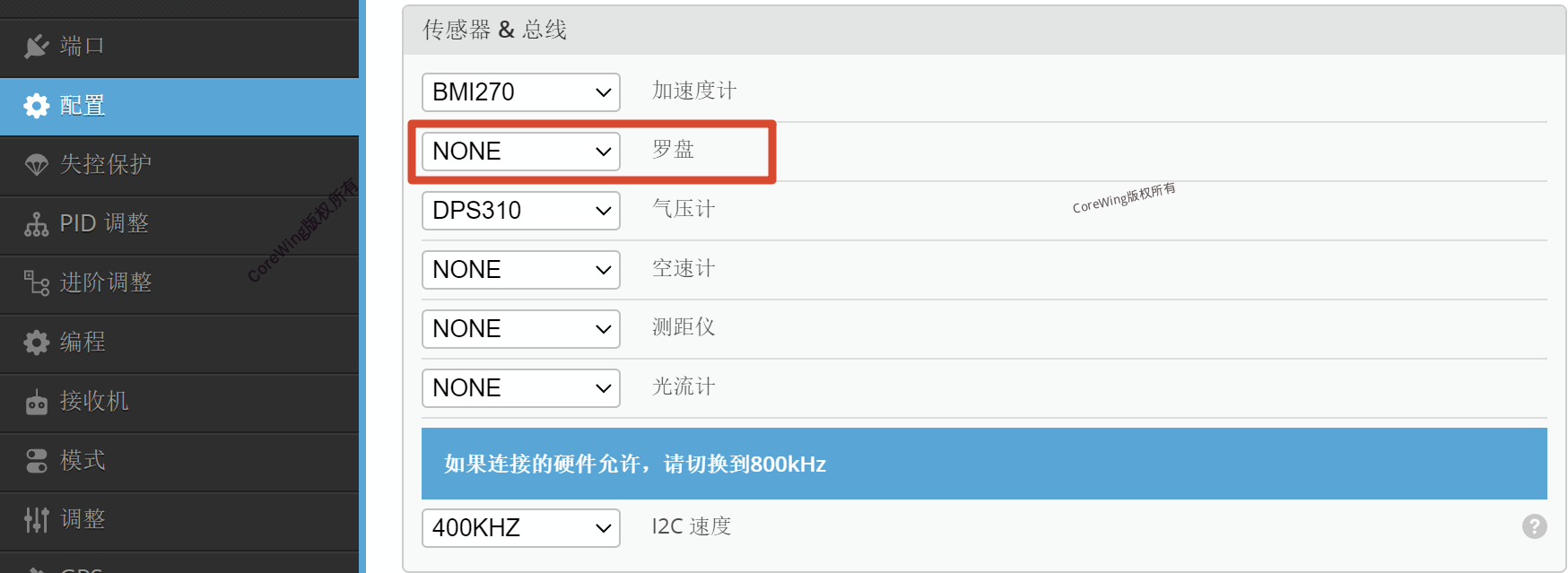
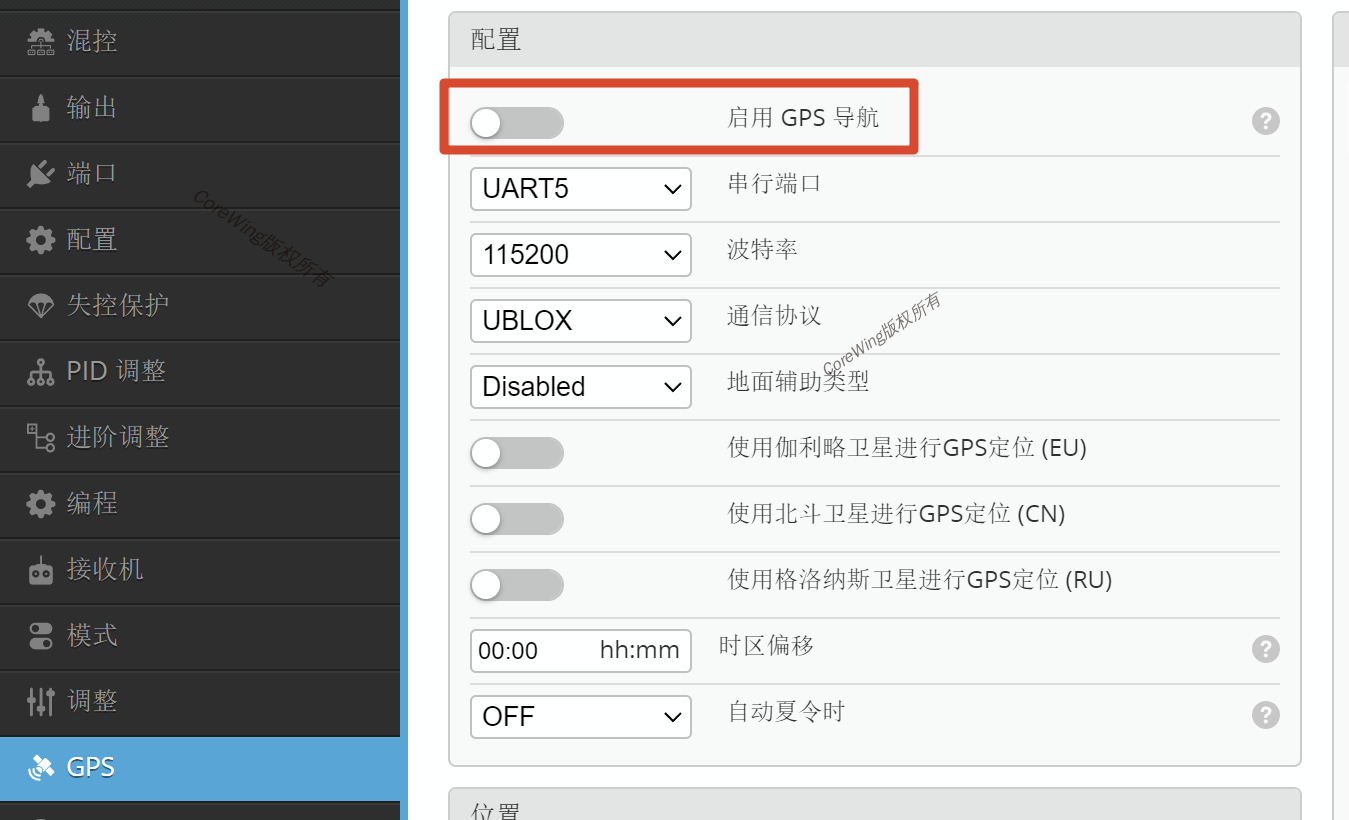
Q1: If I don't want to install a GPS and compass, how can I achieve normal arming instead of force arming?
A1: Ensure all other hardware and settings are completed, with only the GPS and compass missing. Follow the settings shown in the diagram, set the compass to None, turn off the Enable GPS Navigation option, and properly configure the arming channel.

Technical Support QR Code
