
Setting Up and Using Throw-to-Fly Mode
I. Principle
Launch Mode is a feature in INAV firmware specifically designed for takeoff, primarily to help the aircraft achieve stable automatic flight after being launched or released, ensuring the aircraft enters a stable flight state.
When the aircraft enters Launch Mode, the flight controller system automatically completes the transition from the ground to a safe flight altitude based on takeoff throttle, acceleration, flight angle, and the aircraft's own characteristics. During this process, the flight controller monitors the aircraft's acceleration and attitude to ensure a smooth transition in the air and begin normal flight operations.
The working mechanism of Launch Mode includes:
- Throttle activation: The flight controller activates the motors through the throttle setting value to provide sufficient lift for the aircraft.
- Acceleration trigger: By detecting changes in the aircraft's acceleration, the flight controller determines when to initiate takeoff.
- Aircraft attitude control: The flight controller automatically controls the aircraft's attitude during flight to ensure stability after takeoff.
II. Equipment Preparation
1) Flight Controller: This tutorial is applicable to any of the following flight controllers: CoreWing F405 WING V2/CoreWing F405 WING MINI V2.
2) RC Transmitter: Any CRSF protocol or SBUS protocol transmitter will work.
3) Ground Control Station Software: INAV Ground Control Station.
4) Aircraft: Ensure the aircraft is properly assembled and that motors and servos are functioning correctly.
III. Specific Operations
Ground Control Station Settings:
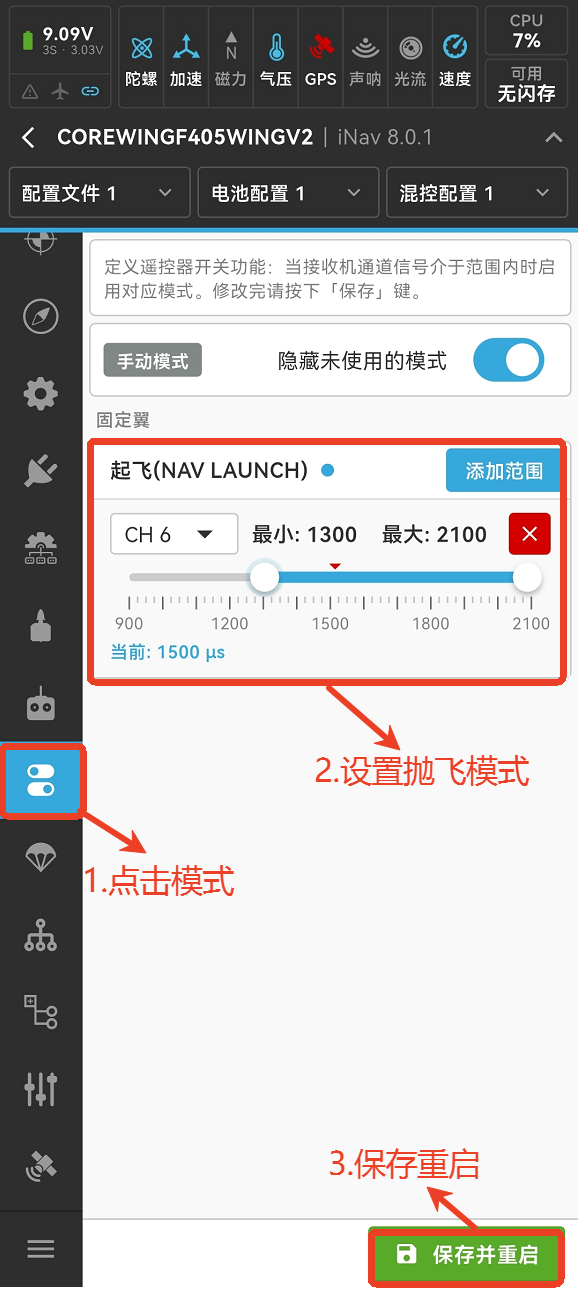
- Enter the mode, referring to the image, and set the auto-launch mode
INAV Ground Control Station: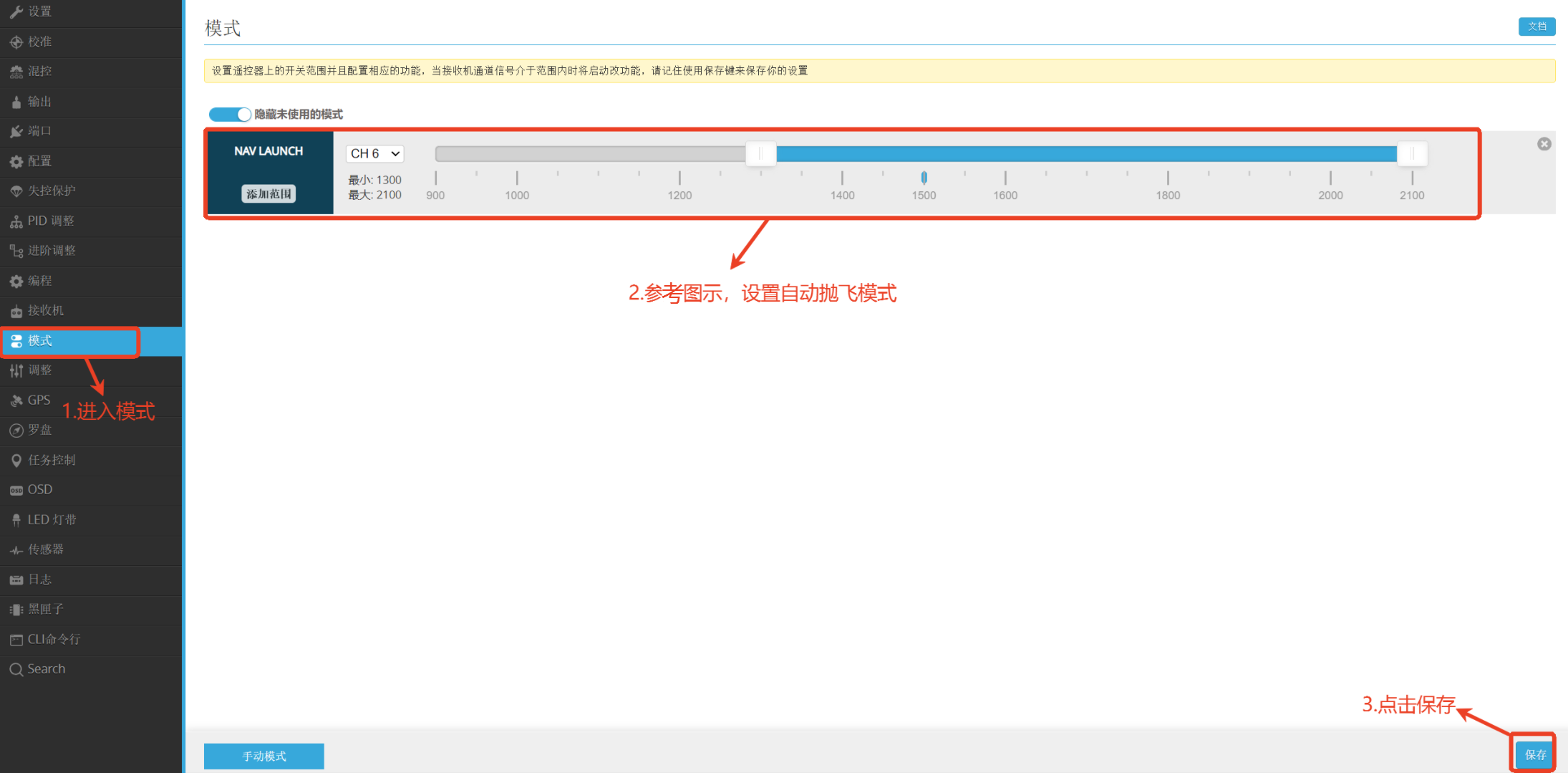
CoreWing APP:
- Enter advanced adjustment, and set parameters as shown
INAV Ground Control Station: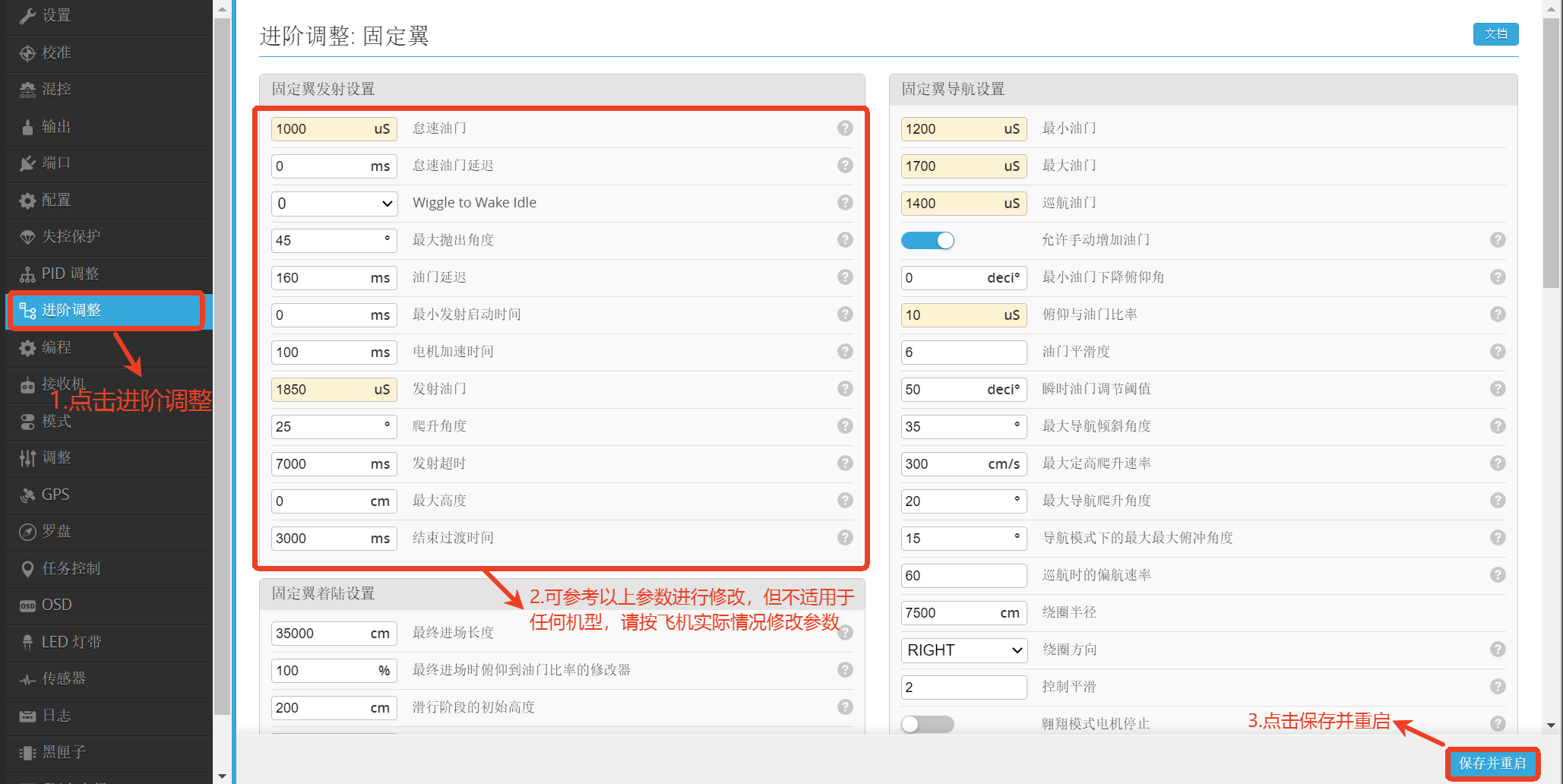
CoreWing APP:
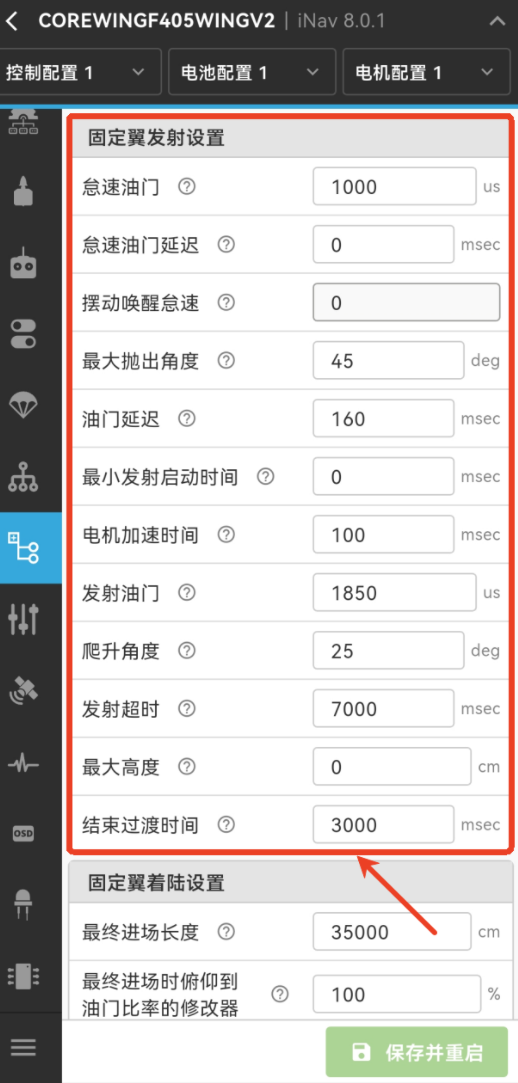
Launch Mode Operations:
1. Self-test and Motor Check
- After the aircraft self-test passes, unlock the flight controller and check if the motors are working properly.
- After confirming the motors are working normally, lock the flight controller to ensure it is in a ready state.
2. Select Flight Mode - On the RC transmitter, select the flight mode you want to use after Launch Mode ends, and ensure the transmitter's switch is set to that mode.
3. Activate Launch Mode - Flip the Launch Mode switch to unlock the flight controller.
- Push the throttle stick to 70% (this throttle percentage can be adjusted based on aircraft performance, but must be at least minimum throttle for level flight + 10%).
4. Check Motor and Control Surface Status - Observe whether the motors are spinning, and ensure the flight controller's buzzer makes a "beep" sound (note: check if the flight controller's buzzer switch is enabled).
- Control surface check: If the control surfaces are deflected and the motors are not spinning, the aircraft has entered Launch Mode.
5. Activate Acceleration and Launch - Shake the aircraft back and forth with your hand to apply acceleration until the motors start spinning.
- Once the motors start spinning, immediately launch the aircraft. (If parameters are set correctly, you can also launch without waiting for the motors to spin, but this method is not recommended for beginners).
6. Flight and Takeover - After the aircraft takes off, ensure it reaches the required safe altitude or the set maximum Launch Mode altitude.
- After reaching the predetermined altitude, turn off Launch Mode and take control of the aircraft to begin manual operation.
Important
While ascending to the preset Launch Mode altitude, you can directly take control of the aircraft with the control sticks, but be mindful of the throttle stick position at this time!
IV. Q&A
Q: The aircraft flies unstably in Launch Mode, how to adjust this?
A:
- Check the flight controller's PID parameters and servo settings to ensure the aircraft can maintain stable flight in manual mode.
- Adjust the takeoff angle and throttle settings to ensure a smooth takeoff process.
Technical Support QR Code
