
Servo Troubleshooting
I. Symptoms
When using a flight controller (FC) with INAV firmware, the following abnormal phenomena may occur after connecting servos:
Symptom 1: Servo shows no response and cannot operate normally
Symptom 2: Servo continuously vibrates or makes abnormal noises
Symptom 3: Servo movement is slow or jerky
Symptom 4: Aircraft is stationary, control surfaces continue to move, and the angle keeps increasing
Symptom 5: Servo intermittent twitching (occurs when connecting peripherals like telemetry)
Symptom 6: Servo abnormally overheats or vibrates severely (possibly connected to a motor port with Dshot enabled)
Normal Phenomenon Explanation
When Output is properly configured, except for pure manual modes (like Manual), in other flight modes (like ANGLE, HORIZON, RTH modes), the servo output port will output signals to correct the aircraft's attitude. In this case, slight servo vibration is a normal phenomenon and no action is needed.
II. Cause Analysis
For the above abnormal phenomena, the possible causes are analyzed as follows:
Symptom 1: Servo shows no response and cannot operate normally
| Possible Cause | Description |
|---|---|
| Incorrect Wiring | Servo port connected incorrectly (connected to SBUS port instead of S1 port) or poor contact |
| Insufficient Power | FC power supply abnormal, no 5V output on servo pin header |
| Firmware Configuration Error | Output configuration did not enable servo and motor output or servo mixing configuration is incorrect |
| Servo Hardware Failure | Servo itself is damaged or internal circuit failure |
Symptom 2: Servo continuously vibrates or makes abnormal noises
| Possible Cause | Description |
|---|---|
| Peripheral Interference | Other peripherals or soldering residues (flux, conformal coating) causing signal interference |
| Brand Compatibility Issues | Certain brands (like Kingmax) have compatibility issues with the FC |
| Power Supply Conflict | ESC BEC connected to FC causing power supply conflict, resulting in unstable voltage |
Symptom 3: Servo movement is slow or jerky
| Possible Cause | Description |
|---|---|
| Insufficient Power | Voltage too low causing insufficient servo torque |
| Mechanical Installation Issues | Control surface mechanical jam or excessive resistance |
Symptom 4: Aircraft is stationary, control surfaces continue to move, and the angle keeps increasing
| Possible Cause | Description |
|---|---|
| FC Installation Angular Deviation | FC installation has angular deviation, PID I value continuously accumulates in self-stabilization mode, causing control surface output to continuously increase |
| Servo Center/Travel Setting Error | Servos minimum/maximum/center values set incorrectly, causing control surfaces to continuously deflect toward one end |
| Incorrect Flight Mode | Currently in self-stabilization mode (like ANGLE/HORIZON) instead of manual mode, FC is outputting correction signals |
| RC Transmitter Input/Trim | RC transmitter stick has input or trim (Subtrim) settings deviating from center position |
Symptom 5: Servo intermittent twitching (occurs when connecting peripherals like telemetry)
| Possible Cause | Description |
|---|---|
| Telemetry Interference | Telemetry module generates electromagnetic interference during operation, affecting servo signals |
| Improper Telemetry Installation | Telemetry is too close to servo or servo cable, interference coupled to signal wire |
| Power Supply Fluctuation | Telemetry causes power supply voltage fluctuations during operation, affecting servo operation |
| Poor Signal Shielding | Servo signal wire not using shielded wire, susceptible to external electromagnetic interference |
Symptom 6: Servo abnormally overheats or vibrates severely (possibly connected to a motor port with Dshot enabled)
| Possible Cause | Description |
|---|---|
| Wrong Dshot Port | Servo mistakenly connected to motor output port configured for Dshot protocol, frequency mismatch |
| Protocol Frequency Mismatch | Servo working frequency (50-333Hz) differs significantly from Dshot frequency (9-37kHz), causing abnormal servo behavior |
Frequency Comparison
| Device/Protocol | Operating Frequency |
|---|---|
| Analog Servo | 50Hz |
| Digital Servo | 250-333Hz (up to 400-500Hz) |
| DShot150 | ~9.375 kHz |
| DShot300 | ~18.75 kHz |
| DShot600 | ~37.5 kHz |
Dshot frequency is 30-750 times the servo frequency, which may cause abnormal heating, vibration, or even burnout of the servo!
III. Hardware Inspection
3.1 Servo Self-Inspection
Brand Compatibility
If using Kingmax brand servos, it is recommended to try replacing them with other brands (such as EMAX, PTK, GDW, etc.) to rule out brand compatibility issues.
Servo Tester Verification:
Using a servo tester can quickly confirm if the servo itself is functioning properly:
| Step | Operation |
|---|---|
| 1 | Connect the servo to the servo tester |
| 2 | Operate the tester and observe the servo response |
| 3 | If the servo still has no response or behaves abnormally, it indicates a fault with the servo itself and needs to be replaced |
Receiver Testing Method (When No Servo Tester is Available):
If you don't have a servo tester, you can test using a receiver that supports PWM output:
| Step | Operation |
|---|---|
| 1 | Successfully bind the receiver to the RC transmitter |
| 2 | Connect the servo directly to the receiver's PWM channel output |
| 3 | Operate the corresponding channel on the RC transmitter and observe if the servo responds normally |
| 4 | If the servo still has no response or behaves abnormally, it indicates a fault with the servo itself and needs to be replaced |
Troubleshooting Order
It is recommended to prioritize using the above methods to verify if the servo is functioning normally. After confirming the servo is not the issue, continue troubleshooting other possible causes such as the flight controller, wiring, firmware, etc.
3.2 Power Supply and Connection Inspection
ESC Power Supply Check:
- Check if the ESC red wire has been removed (to avoid power supply conflicts with the flight controller's BEC)
- Confirm that the flight controller's supply voltage is stable. It is recommended to use a multimeter for measurement. If the servo voltage jumper has not been modified, the default output is around 5V
Servo Wiring Check:
- Confirm correct servo wiring: For CoreWing F405 WING V2 flight controller, the first port from left to right is the SBUS port, the second port is the S1 port
- Confirm that the servo is connected to the servo output interface
- If using servo extension cables, check if the connections are secure to avoid loose connections
Flight Controller Installation Check:
- Confirm that the flight controller is installed level (to avoid abnormalities caused by mechanical installation)
- Check if the flight controller is securely fastened and not prone to shaking
3.3 Peripheral Interference Troubleshooting
Soldering Residue Handling
Confirm if flux or conformal coating was used. If there is residue, clean the pin headers and flight controller interfaces with board cleaner or alcohol to prevent signal interference.
Exclude Other Device Interference:
- Disconnect other peripherals besides the servo (such as telemetry, which might cause servo twitching), keeping only the servo
- Check if the servo output is normal
IV. Receiver and Transmitter Inspection
Frequency Matching Check:
- Confirm that the RC transmitter has successfully bound with the receiver
- Check if the receiver's indicator light is constantly on (indicating successful frequency matching)
Channel Mapping Check:
- Confirm that the receiver channel mapping is correct (view in the "Receiver" page of INAV Configurator)
- Avoid incorrect channel correspondence causing abnormal servo signals
V. Firmware and Settings Inspection
5.1 Firmware Version Confirmation
- Confirm that the correct firmware version has been flashed (recommended to use INAV 8.0.1 version)
5.2 Servo Configuration Page Settings
Check in INAV Configurator:
| Step | Operation |
|---|---|
| 1 | Connect the flight controller to INAV Configurator |
| 2 | Go to the Mixer page |
| 3 | Confirm that motor and servo output mixing has been configured |
| 4 | Check if the minimum/maximum/center values for the corresponding channels are correct |
| 5 | Confirm that the servo is not mistakenly plugged into a motor output channel |
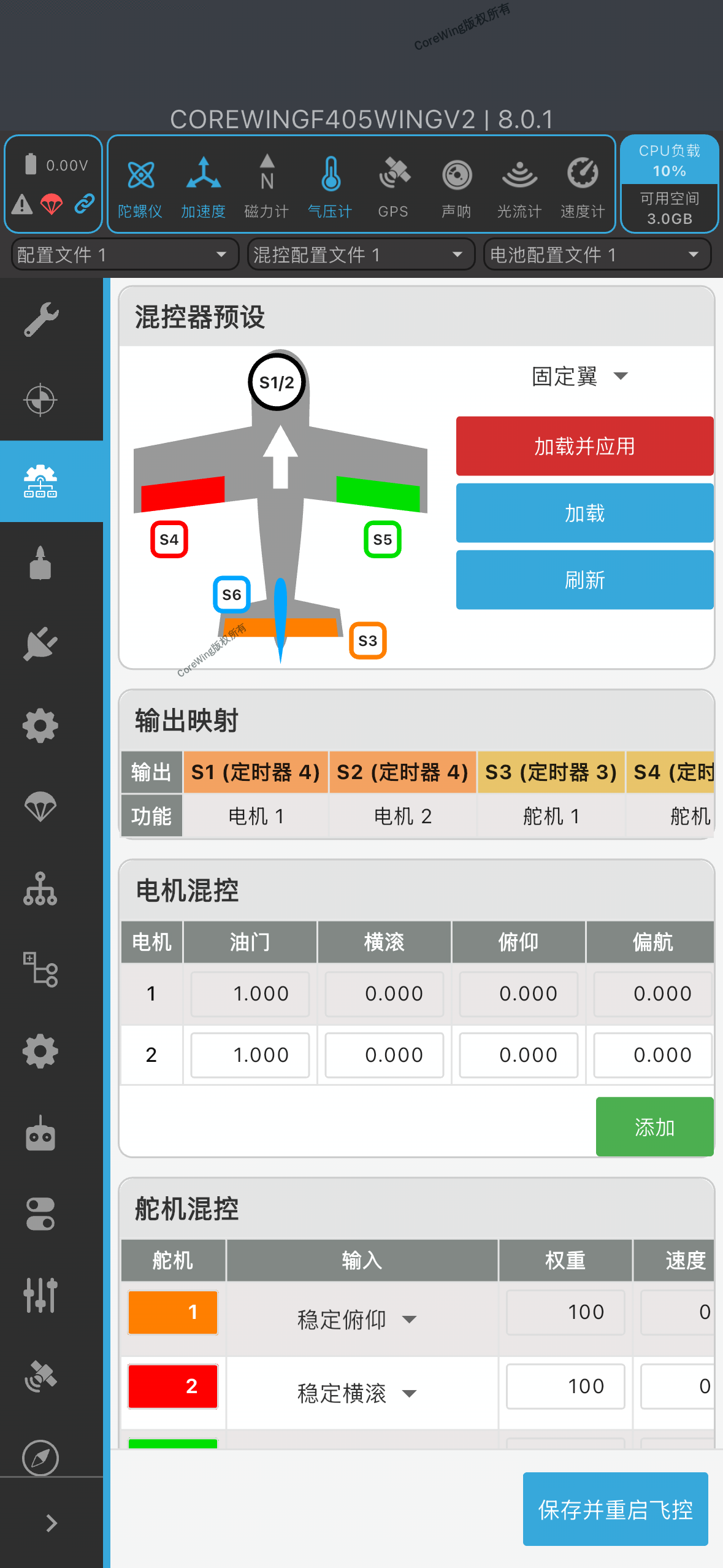
Important Reminder
Check if the servo wiring is correct. If the servo is plugged into a motor output channel with Dshot enabled, due to the huge frequency difference (Dshot is 9-37kHz, servos only need 50-333Hz), it will cause abnormal heating, twitching, or even burning of the servo!
5.3 Flight Mode Check
Testing Recommendation
Switch to pure manual mode (Manual) for testing. In this mode, the flight controller will not output attitude correction signals. If the servo abnormality disappears, the issue is related to self-stabilization mode settings; if the abnormality persists, continue troubleshooting hardware or configuration issues.
- Switch to pure manual mode (Manual) and observe if the servo still has abnormalities
- Do not test servos in autonomous modes such as RTH or AUTO, as the flight controller will actively output correction signals in these modes
VI. Final Confirmation and Verification
6.1 Flight Controller Voltage Test
Use a multimeter to measure the flight controller servo pin header:
Info
Confirm if there is a default 5.0V voltage output. If yes, it indicates that the servo BEC power supply is normal.
6.2 Function Verification Checklist
VII. Common Questions FAQ
Q: Is constant slight servo twitching a malfunction?
A: No. In self-stabilization modes (such as ANGLE, HORIZON, RTH), the flight controller continuously outputs fine-tuning signals to correct attitude, and slight twitching is a normal phenomenon.
Q: What should I do if the servo still doesn't work after replacement?
A: Please use a multimeter to measure the voltage at the flight controller pin header. If there is no 5V output, it may be a flight controller hardware issue. Please contact technical support.
Q: When should the ESC red wire be removed?
A: The flight controller power supply has a servo BEC, so the ESC red wire needs to be removed to avoid power supply conflicts.
Q: What should I do if the servo twitches intermittently after connecting telemetry?
A: This is caused by electromagnetic interference from the telemetry. Troubleshooting methods:
- Disconnect the telemetry and observe if the twitching stops
- Install the telemetry away from the servo and signal wires
- Check if the servo signal wire uses a shielded cable
- Confirm that the telemetry power supply is stable
Q: What causes abnormal heating, overheating, or severe twitching of the servo?
A:
- The servo may be mistakenly connected to a motor output configured for Dshot protocol
- Please check in the "Ports" page of INAV Configurator to confirm if the servo output channel is configured for Dshot
- Check if the servo is mistakenly plugged into a motor output channel
- Dshot frequency (9-37kHz) is dozens of times higher than the servo operating frequency (50-333Hz), which will damage the servo
Technical Support QR Code
